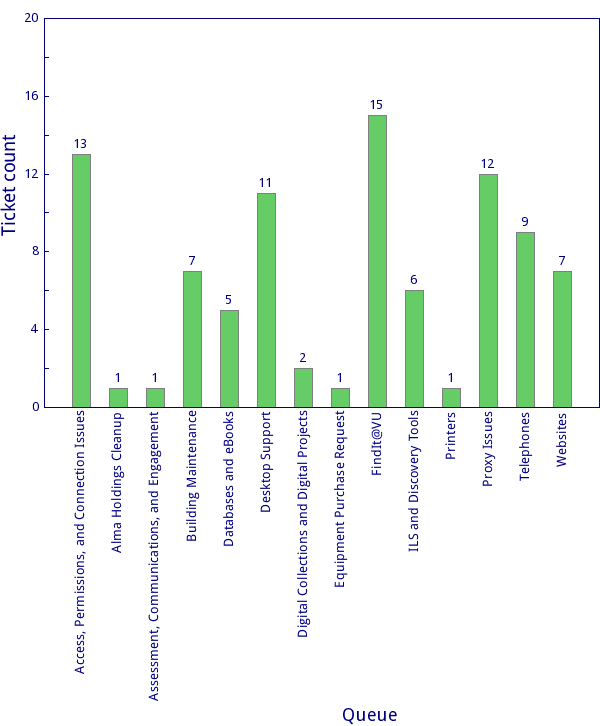
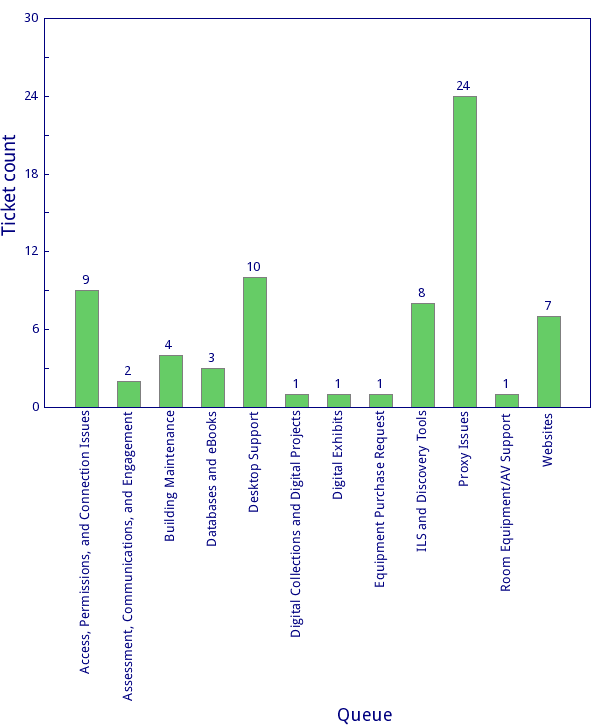
LTDS September 22nd – 28th 2019

LTDS personnel have been diligently working on various projects from across various areas. To name a few:

    • Desktop:
      • Office 365 installation
      • Laptop/Desktop deployments
    • Alma/Primo VE:
      • Testing Fisk user loads
      • Cleaning up user records
      • Circulation/Reserve Desk
    • Digital Collections:
      • TVNews – Accessibility issues
      • TVNews – Forgotten password project
      • Fine arts exhibits
    • Web/Web applications:
      • Clickable room maps
    • Committees:
      • LITA
      • ELUNA Developers Day
      • Exhibits System Task Force
    • Training:
      • Bootstrap 4
      • XSLT/XQuery

LTDS September 15th ÔÇô 21st 2019

LTDS continued to work on several projects and prepare for the upcoming Office 365 mailbox migrations and the switch to the Office 365 suite by staff.


  • Alma/Primo
    • Analytics lab
    • Inventory tool for circulation
    • Moving 856 40 to 956
  • Desktop/Application support
    • Training new student
    • Deploying new desktops
    • Updating Macs in classroom
  • Digital Collections
    • ArchivesSpace interface and plugin work
    • VURJ reboot discussions
    • Fine Arts Gallery Exhibition
  • Web/Web applications
    • Clickable room maps
    • staff purchase request form
    • TVNews
    • Preparing for campus typography web changes
  • Other
    • wordpress and Islandora/Drupal updates


LTDS September 8th ÔÇô 14th 2019

The team continued to work on various projects,  resolve issues and plan for the upcoming 365 migration.

  • Alma/Primo
    • Fisk user load
    • API work for a couple of projects
  • Desktop/Application support
    • Move ILL equipment to new temporary locations
    • New large order for replacing computers
  • Digital Collections
    • Migrating TVnews classic sight to force https using a l.v.e url
    • Review of old exhibit website
  • Web/Web applications
    • Work on clickable maps
    • Revised several web pages including by the numbers
  • Other
    • Library committee work
    • Association committee work


Blocking unwanted calls

Most of us already have in place a method to block spam emails. And with our cell phones, we can easily block calls. But what about Skype for Business? Is there a way to block unwanted calls there? I am here to tell you that yes, there is way to do this, but it does require a little effort. First and foremost, you have to know what number you are wanting to block. Then, we have to create a Contact within Outlook (which is integrated with Skype for Business).

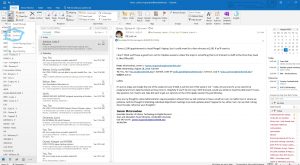
Open up Outlook, go to “New Items” and select “Contact”:
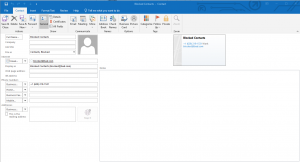
Enter a recognizable name, something like “Blocked Contacts”. Enter a bogeous email address (something like blocked@bad.com). And then under Phone numbers, enter the phone number you want to block. Be sure to include the +1 (for US) and the area code.
Now, go to Skype for Business and search for the contact you created:
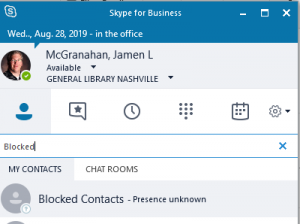
Right-click on the contact, go to “Change Privacy Relationship” and select “Blocked contacts”:
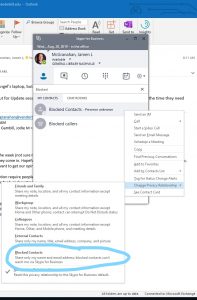
You will then get a message, stating that once this user is blocked, they will not be able to contact you in any way – including phone calls (which is what we want). Just click “OK” and voila!, you are now blocking that unwanted caller. Now please note, you can add more numbers to this contact you created, but only up to 7 numbers. After that, you would need to create another Contact and do the same process as above. Hopefully you will not need to use this a lot, but for those annoying fax calls or telemarketers, it might come in handy.

(Thanks goes to Sele Training who provided a YouTube video explaining this, found here: https://www.youtube.com/watch?v=3CN44dZ6Syc)
LTDS August 18th ÔÇô August 24th 2019

LTDS continued to work on various project and resolve INFORMS.


  • Alma/Primo
    • Large influx of new student works and the need to Alma accounts
    • Reviewing requests and work order priorities in Alma
  • Desktop/Application support
    • Deploying new desktops
    • Continued renaming project
  • Digital Collections
    • Posted new library maps for the Central and Divinity libraries to Fourwinds (wayfinding)
  • Web/Web applications
    • Deployed Survicate (pop-up survey tool) for the public web
    • New homepage for DiSC
  • Other
    • committee and online course work
    • Hiring/re-hiring student workers
    • Gargoyle scanning project

LTDS August 11th ÔÇô August 17th 2019

WOW!  Classes start on the 21st.  The team utilized a portion of the week confirming that user facing items were working as expected and making a few tweaks.  In addition,  the team starting planning training sessions and topics for LTDS update session during the fall.  If you have a topic you would like to have discussed,  please let us know!


  • Alma/Primo
    • New full display deplo4yed
    • Adding LibGuides to VE
  • Desktop/Application support
    • Resolving issues related to AirWatch deployment
    • AD renaming project
  • Digital Collections
    • Vireo development for ETDs
    • Gargoyle scanning
  • Web/Web applications
    • Pop-up survey evaluation/testing
  • Other
    • Scripting OCLC reports
    • Work with SSO for Vireo
    • work on/with various committees


AirWatch for Staff Macs

As many of our staff Mac users are aware, LTDS is in the process of deploying AirWatch, a mobile device management (MDM) solution that the University uses to administrate Macs around campus. Moving to AirWatch allows us to remotely manage our Mac computers through a central online console. Through this console, we’re able to:

  • See the current owner of a computer
  • Read information about the model to inform hardware replacements
  • View the OS version to ensure that everyone is using a currently supported macOS
  • Deploy applications
  • Assign profiles to computers that enforce specified policies, like FileVault encryption
  • Lock the device should it ever become lost or stolen
  • Provide an App Catalog in the Dock from which you can install on-demand applications as desired

If you have any questions about or issues with AirWatch, please let us know.

LTDS August 4th – August 10th 2019

Another busy week for the team.  Everyone work towards wrapping up projects before students return in 2 weeks!


  • Alma/Primo
    • Alma analytics lab sessions
    • 21North Re-barcoding project
    • Copying rules from the sandbox (sandbox was refreshed this weekend)
  • Desktop/Application support
    • Continued renaming project
    • deploy new laptops/desktops
  • Digital Collections
    • Catch up on ETDs
    • Continued work on new ETD system
  • Web/Web applications
    • ETANA Broken link checker
    • TVNews forgot password project
  • Other
    • Continued work on SSO/Ping
    • Continued to prepare for l.v.e. MX entry move


LTDS July 29th ÔÇô August 3rd 2019

LTDS continued to work on various projects and resolving INFORM tickets.  The team also started to plan for upcoming monthly update sessions starting this month.  If you have a topic you would like to have covered during an upcoming session,  please let me know.


  • Alma/Primo
    • Hack-a-thon to split Acquisitions and Cataloging in Alma
    • Normalization rules for VE
    • Government Documents Work Order
  • Desktop/Application support
    • Started wide deployment of AirWatch /Workspace One
    • Processing orders for new machines — regular replacements
  • Digital Collections
    • WordCloud changes and improvements
    • Continued work on Vireo — the new ETD systems
    • working with the 3D camera
  • Web/Web applications
    • Converting web apps to mysqli
    • TVNews Password change form
  • Other
    • Learning Ruby and Rails
    • Planing for fall projects
    • Troubleshooting


LTDS July 21st ÔÇô July 28th 2019

All of the team was back from taking vacation!  Several team members spend time catching up on email and outstanding INFORM requests.  The team continued to work on various summer projects and start planning for fall project priorities.


  • Alma/Primo
    • Preparing for upcoming acquisitions/cataloging hack-a-thon
    • Work on Music library registration form
  • Desktop/Application support
    • Resolved several issues with systems at 21 North
    • Continued renaming project
  • Digital Collections
    • Continued to work on new ETD submission system
    • Answering questions from users concerning the current ETD system
    • Modifications to the current exhibits being displayed on the Central interactive screens
  • Web/Web applications
    • Created new WordPress site
    • Adding additional error checking for the Today’s hours script
  • Other
    • Development work for Wordcloud v.2
    • Continued professional development though web courses.
    • Documenting possible issues with the email Office 365 migration process.