Using Microsoft Planner to organize your projects

A few years ago, many of us in the library discovered Trello and began using it to help our projects stay on track and organized. It’s been a wonderful tool, but unfortunately for us, they recently went to a new pricing setup that prevents the library from using it going forward.

Fortunately, this happened just as the library was starting to move toward using the Office 365 suite of applications provided by the university. One of the applications in the suite is Microsoft Planner, a project planning tool that is very similar to Trello. LTDS is encouraging library staff to make the transition to Planner as you have new projects to track. Several library groups have already started using Planner, including LTDS (unit), ACE (unit), and the Revised Common Lectionary group (project). You might want to use it as a department, a committee/task force, a project group, or any other configuration of people. It’s up to you!

Don’t worry — we’re here to help you get started! Simply submit an Inform to get the process rolling. LTDS must do the initial setup for you at this time, and then you’ll have free reign to set up your tasks (cards) within your plan (board). LTDS is also available to provide a basic overview of the Planner interface.
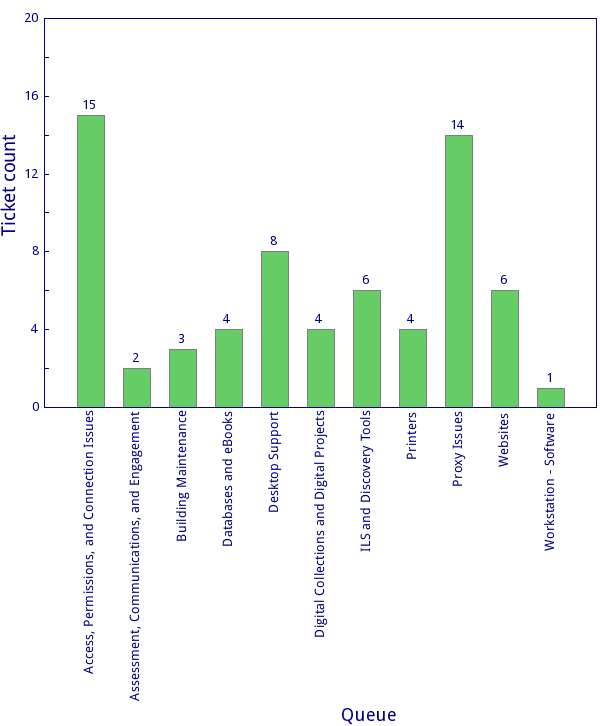
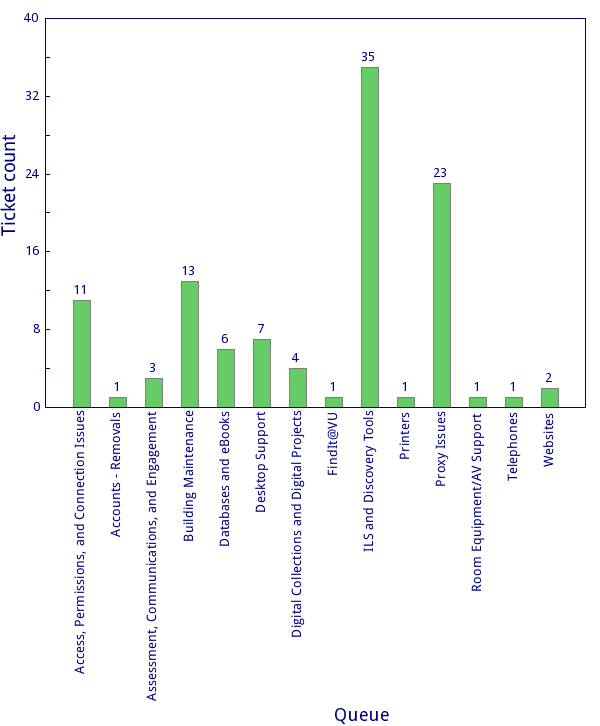
LTDS July 14th ÔÇô July 20th 2019

LTDS team members spend a great deal of time working on professional development opportunities including online courses on web accessibility, rails, and working with the library carpentry sessions. In addition to these items the team working on various issues including:

  • Alma/Primo
    • Fine issues
    • Never ending Alma user issues
    • Reviewing self-check policies in Divinity/Central
  • Desktop/Application support
    • continued to deploy meeScans
    • distributed mouse pads for the public computers
  • Digital Collections
    • ETD questions and assisting students
  • Web/Web applications
    • Completed audit for staff directory/organization chart
    • updated proxy server ssl certificate
  • Other
    • Installed JBOD and UPS for TVNews
    • Converted public website to use new campus calendar


Build Your Own Search Widget

Did you know that you can create your own search box, customized to included limits such as your Library or even a search query? It is readily available to anyone who would like to try it out and is found here:

https://apps.library.vanderbilt.edu/primo-search/

Where can you use this widget? If you have a Libguide and want to actually “guide” students to resources, you can do so by providing this search widget. This is just one of many tools we have available. Try it out and let us know what you think!

Your LTDS Team

LTDS July 7th ÔÇô July 13th 2019

Another busy week for LTDS.  A couple of team members took well deserved vacations during the week but the rest of the team continued to work through summer projects and INFORMs.  A few of the items the team worked on are listed below.

  • Alma/Primo
    • Prepared for Sandbox refreshed scheduled for August
    • Worked with OCLC to get the Alma/OCLC sync to work as needed.
    • Deployed meeScan stations in Central and Divinity
  • Desktop/Application support
    • Worked on renaming systems and confirming SCCM availability
    • Continued to test AirWatch
    • Prepared for first hardware order in FY20
    • LTDS orientation meeting with LTDS for new staff
  • Digital Collections
    • Added “Forgot Password” feature to TVNews
    • Updated missing thumbnails for several Helguerra documents
  • Web/Web applications
    • Completed wordpress migration to google tag manager
    • Continued work on the staff directory/org chart audit program
  • Other
    • Continued working to convert servers to public key authentication instead of username/password.
    • Updated ArchivesSpace
    • Listserv Lists cleanup

LTDS June 30th – July 6th 2019

The LTDS was closed Thursday and Friday of this week resulting in a short week for the team.    LTDS utilized the first of the week to continue work on summer projects and resolve various INForm requests.  We hope everyone had a great 4th of July.


“Libraries are about Freedom. Freedom to read, freedom of ideas, freedom of communication. They are about education (which is not a process that finishes the day we leave school or university), about entertainment, about making safe spaces, and about access to information.”

ÔÇò┬áNeil Gaiman,┬áThe View from the Cheap Seats: Selected Nonfiction

LTDS June 23th – June 29th

LTDS continued to work in various summer projects including the ETD system,  meeScan and various preservation systems related projects.   The team also started closing out various projects for the fiscal year and Jodie presented the final LTDS update session until August.

As we look forward to exciting changes and new opportunities during fiscal year 2020,  we would like know if you have a topic you would like covered during a monthly update sessions, or if you have a project that we can help with during the coming months.


  • Alma/Primo
    • Created ScholarsTrust report
    • Work on grima configurations
  • Desktop/Application support
    • Troubleshooting and resetting wifi settings for the classroom laptops
    • Airwatch
  • Digital Collections
    • ArchivesSpace User interface changes
    • Started configuring new ETD system
    • Continued work towards the Contini migration
  • Web/Web applications
    • Tag manager setup
    • Completed work on new TVNews loan script
  • Other
    • Attended ALA and several associated meetings, board meetings, and council sessions.
    • Completed several continuing education sessions from Library Juice
    • LTDS June update session.


LTDS June Update Session

Thanks to all who attended our June update session yesterday! Jodie presented some web statistics trivia questions, and a good time was had by all. You can find the slides in the LTDS SharePoint site in our Training Materials and Presentations folder (VUnetID login required). If you have any follow-up questions, don’t hesitate to reach out!

LTDS June 16th – June 22th


  • Alma/Primo
    • Adjusted settings for meeScan deployment
    • New titles list
    • Scholars Trust reports
  • Desktop/Application support
    • Resolved various issues related to outlook
    • Prepared for surplus computer pickup.
  • Digital Collections
    • Continued to work with XSLT for Contini migration
      • ETD new system migration
  • Web/Web applications
    • GTM for Heard Alert and multisite
  • Other
    • Cleaning up 401 for surplus pickup
    • Various professional development courses


LTDS June 9th – June 15th

LTDS continued to work on various projects during this week.


  • Alma/Primo
    • Scripted course removal
    • EDI EBSCO┬á setup for┬á Law
  • Desktop/Application support
    • Prepared laptops for athlete workshop and assisted with setup
  • Digital Collections
    • Continued circulating rare book digitization project
    • Check in Hathitrust for rare books being digitized
    • Continued to scan MZO materials
  • Web/Web applications
    • Troubleshooting an issue with OJS
  • Other
    • Attended eBUG
    • Migrated a couple of databases from mysql to mysql2
    • Configured new dev server for Digital collections

My Account to EResources

One of the benefits of using the same authentication system for both Alma and EZProxy is that we can offer true Single-Sign-On services. This is why we strongly encourage users to log into “My Account” first (“Sign In” on https://catalog.library.vanderbilt.edu/).

This does assume the users have accounts in Alma – accounts that are using VUNet ID as their Primary Identifier and are set as External. By doing this, when users log into “My Account”, their information will automatically pass them through to other resources that they are authorized for.