LTDS Last week (July 23-28)


Alma, PrimoVE, and the web refresh went live  Monday and Tuesday!  Although these activities we the highlight of the week,  the team also worked on several additional items including the issues below.

  1. Circulation transactions in Alma are duplicated
    1. Caused by some transactions not loading correctly during the final switch over.  Ex Libris is working on the solution.  We expect this to be resolved within a week
  2. Duplicate charges appearing in user accounts
    1. This is the same issue as #1 and should be resolved within a week
  3. Missing holding and item records
    1. Some of the items and data (<0.3%) did not migrated correctly.  Many of these can be corrected in an automate method but the fix needs to wait until the circulation transaction issue is resolved (#1).
  4. Web site access strangeness
    1. The majority of these issues were caused by the DNS changes and were corrected within 24 hours as the various DNS servers were updated.  At least one issue was caused by the storage issues across campus (see #6) but has been resolved.
  5. Unable to connect to Acorn/Workflows to verify information
    1. This is a side effect of the storage issues on Wednesday.  It appears that the indexes were corrupted which we are working to resolve now (thanks Jamen).
  6. Non-responsiveness of the Lectionary, ETD, DiscoverArchive, Digital Collections news online, public website (indirectly),  and other applications
    1. Caused by a campus storage issue on Wednesday and has been resolved.
  7. Some public computers (virtual computers) not responding or unable to login
    1. Caused by the storage issue (#6) and should all be respond now.
  8. TVNews Standard Definition SnapStream server in the Baker server room
    1. The issue originated with a blown transform across from Baker.  Once the power was restored, the UPS in the server room did not respond.  This is the only remaining server in Baker and is in Baker due to the cable connections.  The system is now running but we are working on a permanent solution.
  9. A few printers with scan to email functionality stopped sending email.
    1. A side effect of the web refresh, web server migration.  Most (all??) of these issues have been corrected.
  10. Various Alma items
    1. The implementation team is working to update the configuration in various areas of the system.   Many of these changes had been in pre-production but added after June 27th.  As a result, the change need to be made again in the system (many thanks to Jake, Michael, Mary Ellen, Tao, Nancy, and Jamen for quickly starting the edits).
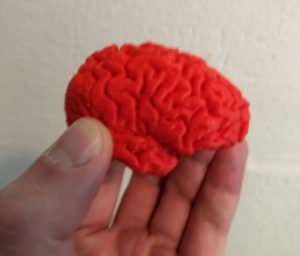
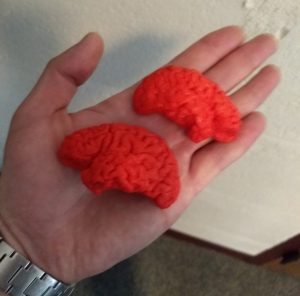
Brains!

We thought it would be fun to show you an example of something we print with our 3D printers. This is a print of a brain scan one of our patrons had made during a study they participated in. They were able to convert the scan to a file compatible with our printers.

Why not take a look at a site like Thingiverse and find something you would like to print? Then you can email the .STL file or a web link to ebl3dprint@vanderbilt.edu to have it printed.

What happens with my links to books and searches in Alma?

I have links to books and searches in Acorn.  What happens when we migrate from Acorn and DiscoverLibrary?

Many people have created links using the options available at http://acorn.library.vanderbilt.edu/help/ to use in training materials as well as permalinks from DiscoverLibrary and to FindIt@VU (SFX) resources.  LTDS has created several redirects that will allow these links to continue to work after we go live with Alma/Primo.    We believe that these redirects will handle the majority of links to resources.  However,  if you encounter a broken link please submit an INFORM and we can review the issue.

We have attempted to simulate the type of links in the new system.  A full list of the current type of redirects is available at https://ltds.library.vanderbilt.edu/primo/primo-acorn-sfx-redirects/ .  Please let me know if you have any questions about the type of redirected searches or if we have missed any links.


Updating Library Hours/Closed Dates in Alma

Alma allows staff in each library to update the library hours in Alma. Staff assigned to do this must have the Circulation Desk Manager role for that library. Ideally there should be more than one staff member able to update library hours in each library. However, if both of those people are out of the office, LTDS can still change the hours for any of the libraries. Just submit an INFORM in plenty of time before the hours change.
Questions? Please submit an INFORM.

Technical Freeze Starts This Weekend – So What Can I Do??

What is going to happen this weekend? What will I be able to do? What can be done during the Technical Services freeze? These are all valid and reasonable questions, which I will try to address in this post. No fear, though – you will still be able to work!

Starting this weekend (June 22/23), as soon as Mary Ellen completes the fiscal year roll over (after which she will notify myself), I will launch several scripts on the Acorn server in order to do the full extract of our Symphony data. This is a server-load intensive process and requires several hours of work, during which time Workflows/Acorn will be impacted. You may see slowness. You may have difficulty logging into Workflows. Acorn (web catalog) may be down. DiscoverLibrary will only be impacted if it has trouble picking up the Real-Time Availability information from Symphony, but searching should be fine. My Account feature may also be impacted. But please be patient. We have to do this because Ex Libris needs the data no later than Wednesday, June 27; but our goal is to get the extract done by Monday, June 25, so we can review the data for any errors.

In addition to Acorn, we also need to provide Ex Libris a full extract of our SFX and Verde data. Those processes do not take too long to complete and since they are on separate servers, will not have a huge impact on library services.

But Symphony is a different beast. You may wonder why it takes so long. This is because not only are we extracting all of the data (which, by the way, are millions of records), but we also have to modify some of the data in order to meet Ex Libris’s data requirements (specifically, the Invoices and Orders). This is where it gets tricky, which is why we want a day or two in order to review the data to make sure it is as accurate as we can get it before sending it off. We know from experience that we cannot always depend on the scripts to run correctly all of the time, so we need to be able to re-run the scripts if it obvious there was a problem.

During this time, we specifically request that no large reports be ran because that will slow the process down even further. If it is apparent that a report is running and it taking longer than normal, I will kill the report which means you will need to re-run it once the extract completes. We want to get this done as quickly and as efficiently as possible. In order to do that, we need to minimize the number of processes running on the server, which includes reports.

Once the extract is complete, everything should return to normal. However, if you modify a bibliographic record, add an item record, pay an invoice or any other Technical Services activity after the extract completes, that data will be LOST because we will not be doing another extract of our entire system. On July 18, there will be a Circulation Freeze after which we will need to use Alma’s Offline Circulation Utility for circulation transactions. This means all functions within Symphony should be discontinued. At this time, I will extract patrons, loans, and holds from Symphony and send to Ex Libris. And on July 20, we go live with Alma.

Between June 22 and July 20, you can still use Symphony for running reports, as long as they are read-only reports (not writing). This would be a good time for any statistical data you need to gather. You could also be looking for problems that are currently in Symphony (problem records, diacritics, etc.) and make note of these so that at Go Live, you have a list of items you can check to see if they are any better. You can also compare with our Alma instance at that time to see how the data looks. Alma will be available during most of this time until Ex Libris copies over the data, so you can continue testing and training and honing your skills. This would also be a good time to go through the various training modules available from Ex Libris (https://knowledge.exlibrisgroup.com/), especially if you are unclear on how to do something, so there is plenty of work to be done.

We are trying to make this as painless as possible, but take a deep breath. Learn. Live. Laugh – and have fun. We are all in this together!

ILLiad upgraded on May 20th

The ILLiad server was upgraded on May 20th after discussions with ILL.  The timing of the upgrade was moved up in order to allow ILL (Central ILL, Law, and Biomed), the ILS Implementation team, and LTDS to work on integration with Alma.  The upgrade went well and most clients were updated without any incident (right mouse click on the icon an select run as administrator).  LTDS has received a couple of issue reports since the upgrade.  The initial issue with sending out notifications has been corrected.  We are still investigating an issue when attempting to view library information in the OCLC Holdings tab.  We hope to have this resolved shortly.

Please contact LTDS if you have any questions or concerns.

Zip File Importer for Islandora Now Available

Step by step instructions are now available for ingesting ZIP files into VanderbiltÔÇÖs Digital Collections,┬áthe central access point for the Vanderbilt LibrariesÔÇÖ digitized special collections. ┬áInstructions can be found here. https://ltds.library.vanderbilt.edu/library-staff-pages/islandora-ingest/┬áYou must be logged in to access the link.

Additional updates and changes are in store for Digital Collections in the coming weeks and months. Stay tuned!

Post conference report for ELUNA 2018

Ex Libris User group North America (ELUNA) 2018 conference was held at Spokane, WA during May 1st to May 5th, 2018.  here are some takeaways from me.

General Impression: 

The conference was well organized,  in addition to a nice conference program booklet, all presentation slides are made available to attendee in Sched; it was well attended, this is the first time more than 1000+ people attended the conference.  It is a friendly and enthusiastic community, no matter whom you met, whether they are in the process of migration, a newly migrated customers, or an experienced users, everyone is willing to help, to share tips and tricks, to provide suggestions, and to voice concerns.

Useful and amazing sessions I attended during the conferences: 

Exlibris product updates:

  • Primo VE: see the benefits of streamlining Primo and Alma
  • Extending your library with the Alma Open Platform:┬á Developer API

How things are done at other libraries:

  • New Book Showcases via Primo / University of Manitoba
  • Implementing new books location and a new items list / Univ. of Minnesota Duluth
  • Alma integration: connecting other systems / Williams College
  • SpringShare suite integration

Technical tips and tricks:

  • Alma Fulfillment configurations
  • Target messages using Alma letters and notifications / Oregon State University
  • Intermediate analytics and reports functions and examples

Networking:

  • Julie, Calida, Erin and I met Travis from ETSU, to learn about how ETSU manages digital databases and E- resources in Alma, and generate and maintain libguides database A-Z list using Alma records.
  • Our Alma implementation team met with Rice Alma implementation team, exchange ideas on migrating to Alma from SirsiDynix Symphony
  • Bluegrass user group and Tennessee Alma users met at Eluna

Links to conference documents: 

Presentation slides for customer presentations will be posted to the ELUNA Document Repository as soon as is possible. Likewise, Ex Libris will be posting slidedecks from its staff presentations to the Knowledge Center soon.

Make Yourself Heard! Use A Microphone

Please remember that when we are taping an event in the Community Room your voice will not be recorded if you do not speak into a microphone. We currently do not have a microphone that picks up sound for the whole room.

It is a good practice to use a microphone during an event whether or not it is being recorded to make sure that all attending can hear what is going on, making sure to hold the microphone near (but not too near) your mouth when speaking. It is also best when taking questions or comments from an audience member who does not have a microphone, to repeat what they have said before responding.