LTDS August 26 – August 30

LTDS continued to work on cleanup projects in Alma and finalize (for now) various configurations.┬á The team is also reviewing projects that have been tabled — including deploying additional laptops to staff and for circulation.

This week we also had our students return!!   Please welcome Jonah, Sam, Gabriel, Maya, and  Cindy!

A few of the items this week were:

Alma/Primo (Jamen, Nancy, Tao)

  • Revised several notices including Acquisitions notices
  • Removed XXX users (old staff accounts from Sirsi)
  • Continued to work on clean-up projects including the duplicate charges
  • Suppresses more that 65,000 items from display that were in the withdrawn location.

Desktop/Application support (Judy, Matt)

  • Deployed a few new workstations

Digital Collections (Nathan, Judy, Scott)

  • DIL got up to full speed with a working plan for scanning
  • Continued to upload items into the system


Web/Web applications  (Jodie, Matt)

  • Added error checking on the web site to prevent issues caused by other servers crashing
  • Started discussions and plans for the adopt-a-book site
  • Continued accessibility improvements.
  • Launch of the news desk

Other (all):

  • Students returned!┬á Work with them to alert them of changes,
  • triage inform tickets and feedback form
  • Alumni access issues

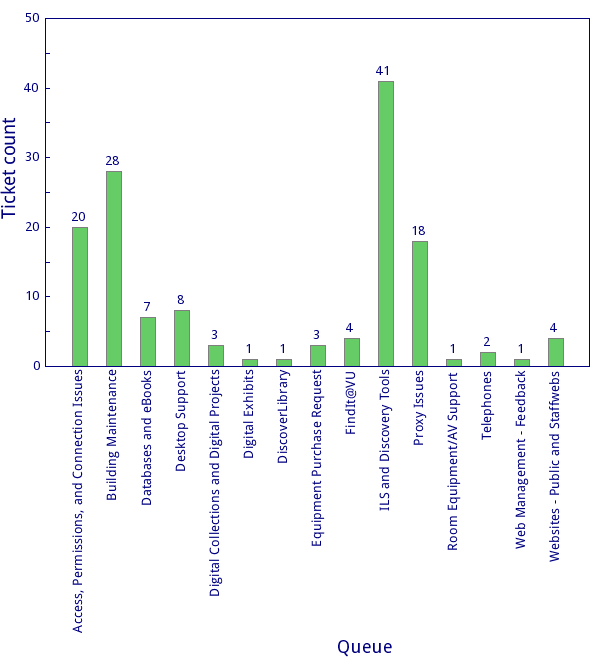
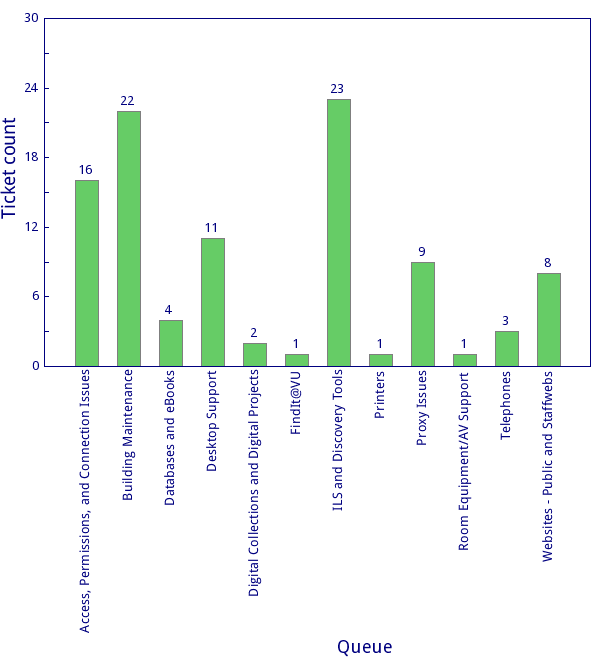
Inform tickets resolved through Thursday.


Library website: now with more error checking

Yesterday morning, we received several reports that the library website wasn’t functioning properly — there were missing menus and scary error messages. No one on our team had made any changes to the site, though — so what happened?

Well, over in another part of the university, the server that hosts the university calendar system went offline. The library website pulls our events lists from this system every time you visit a library homepage. So, when the library website tried to find the events lists, there was nothing there…so the library website said, STOP!┬áI cannot do anything else until I find the events! (not unlike my 2-year-old kid┬á­ƒÿà), and it stopped loading the page midway-through.

Once we identified the issue, we removed all events boxes as a temporary measure. Later in the day, we were able to put in a code fix that tells the library website to keep on going, even if it doesn’t find any events. (Ditto Recent Library News items, which pulls from the Library News Online site.)

Even better, we were able to share our solution with the university’s web department, who then implemented the fix in the main university website. More stable sites for all!

LTDS August 19 ÔÇô 25, 2018

Although work on Alma issues continue in LTDS, the team was able to address a few other areas last week.  Please let us know if you have questions about other LTDS activities.

Alma/Primo (Jamen, Nancy, Tao)

  • Continued to address issues from migration including clean-up projects
  • Revised user letters/notices
  • Correct circulation transactions
  • Worked on EDI ordering/invoiceing


Desktop/Application support (Judy, Matt)

  • Setup Macs
  • Imaged and deployed additional machines

Digital Collections (Nathan, Judy, Scott)

  • Ingested ESSS and Commodore┬á collections
  • Worked on issues associated with displaying PDFS
  • Started rebuilding solr index
  • Shifted DIL workflow to Adobe
  • Scanned items for exhibit

Web/Web applications  (Jodie, Matt)

  • edited javascript
  • Addresses issues from the feedback form
  • Added to documentation

Other:

  • Upgraded archivesspace
  • continued work on AD cleanup
  • Worked with VUIT to hand-off A/V Support
  • Worked to revised the VURJ


WhatÔÇÖs New in the Digital Imaging Laboratory

Successful digitization results in a digital image that best depicts the physical item being digitized as accurately as possible. To ensure truthful color reproduction, color values must be matched to a known target.

Library Technology and Digital Services recently acquired X-riteÔÇÖs ColorChecker, color reference targets, and camera calibration software for use in the Digital Imaging Laboratory. A digital image of the ColorCheckerÔÇÖs reference target is captured by each digital camera in the laboratory. These images are uploaded in ColorCheckerÔÇÖs software to create a DNG file. The DNG file is used to create a color profile. The color profile is then used across the labÔÇÖs image editing software to calibrate or recalibrate the color values of images created by the laboratoryÔÇÖs cameras.

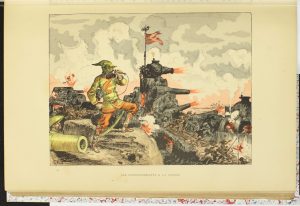
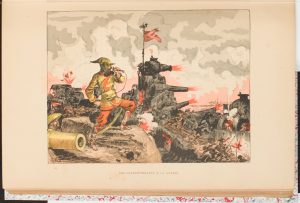
The following samples from Le Vingtieme Siecle illustrate a digital image before color calibration and after color calibration.

Before:

After:

It is easy to discern the difference in color values. The color values of the bottom image best match the color values of the actual page.The ability to ensure color accuracy is vital to any digitization project.

LTDS August 12 – 19, 2018

The team continues to work on clean-up projects while balancing enhancements to Alma/Primo with other projects that were delayed due to implementation.

  • Alma/Primo (Jamen, Nancy, Tao)
    • Added users and refined roles
    • Loaded orders
    • Completed registration form and implemented
    • Continued work on clean-up projects (removing duplicate barcodes)
    • Discussed TOU changes
    • Prepared for changes to the letters
    • Working through migration issues
  • Desktop/Application support (Judy, Matt)
    • Replaced several smaller monitors
    • Configured a new mac mini for Central reference
    • Replaced and re-imaged several computers for staff
  • Digital Collections (Nathan, Judy, Scott)
    • Continued to add more items to Fedora
    • Re-calibrated scanner
    • Continued preparation for the Islandora audit
  • Web (Matt Jodie)
    • New WordPress site
    • Updated wording on TVNews website
    • Corrected errors resulting from migration
    • Tested accessibility improvements
  • Other (all)
    • Worked with VUIT to help hand-off classroom support (fall semester trial)
    • Continued to catch up on processing new and older ETDS
    • Upgraded Archives space

The team also resolved various issues reported through INFORM.

How to “Share Your Desktop”

Occasionally, we in LTDS will ask you to share your desktop with us. Now if you are not familiar with this concept, you may wonder how you are going to bring your desk to us and/or how that is going to help.

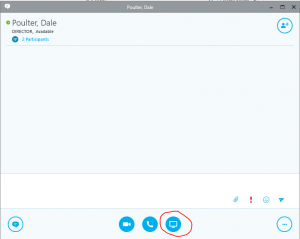
What we mean by “share your desktop” is for you to launch an application that will essentially show us what you are seeing at that very moment on your computer screen. How is this done? Actually, it is fairly simple. You know that application we chat with – the application that all of us have access to? It’s former name was Lync, but now it is called Skype for Business. When you are chatting with one of us, and we ask you to share your desktop, if you look at the bottom of your chat window, you will see a number of different icons. The one you want to click on looks like a monitor:

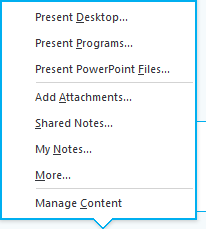
When you click that icon, you will see the following options:

Select “Present Desktop” and voila! You have just shared your desktop with us. See – pretty simple. And in fact, anyone who is using Lync can do this, so if you have a colleague in your department who is tech savy and you are chatting with them, you can share your screen with them so they can see what is happening. They may even request control which essentially allows them to remotely “fix” your machine. Once done, you just end the session and the sharing stops. If you have any questions about this, feel free to ask! We are here to help.


LTDS August 6th – 10th 2018

The team continued to review  INFORM requests and prioritize various tickets and began to work on reducing some of the back-log.  Beyond working on INFORM tickets and communicating various project status, the team also worked on many items including:

  • Alma/Primo (Nancy, Jamen, Tao)
    • Completed loading missing items
    • Started configuration of Proquest EDI
    • Continued to create/modify user roles as needed
  • Digital Collections (Nathan, Judy, Scott)
    • Continued to load ESSSS and Commodores to reduce back-log
    • Reviewing display changes in Archives Space
    • Scanned materials for Curator talk
  • Web (Jodie and Matt)
    • Continued to work on reported issues with areas of the new website
    • Adjust some text on the TVNews┬á website
    • Worked on Google Tag Manager configuration
  • Other items (All)
    • Caught up on ETDs
    • Met with Discover Garden to discuss audit process
    • Re-image and replace several older computers
    • Attended several meetings with others in the library and on campus.
    • Began preparing for migrating the library SharePoint environment to the new version
    • Started review of the Library Active Directory (AD) Organizational Unit (OU) in preparation for the new directory services (project Genesis)


LTDS July 30 – August 3 2018

Although the web refresh is in production and we have gone live with Alma,  the team continues to work on both systems.  The team is also reviewing additional projects that have been on hold.  A few of the items that LTDS worked on last week are below.

  • Alma/Primo (Nancy, Jamen, Tao)
    • added missing holdings records
    • EDI profile creation
    • continue work adding users
    • procedures for adding batch records
    • Adding and reviewing work orders
  • Digital Collections (Nathan, Judy, Scott)
    • Several items digitized for publications
    • Continued to add items to the repository
    • Upgrade Islandora Modules
    • Reviewing the DIL operations in comparison to Washington University’s lab
    • Began preparation for Discovery Gardens review of our configurations
  • Web (Jodie and Matt)
    • Several projects related to the staff directory
    • Continued to review methods to optimize the website
  • ETD (Nancy)
    • During the migration,┬á processing ETDs were slowed down. Work to resolve the back log is proceeding
  • 3D Lab (Scott)
    • Moved and performed some maintenance on the printers
  • Other items (All)
    • Responding to various Inform tickets
    • Adding documentation for the web site,┬á Alma/Primo, and other projects
    • Investigating power options in Baker
    • Continued to work on printer/scanner issues